
Case Study: NutriList
[CONCEPTUAL PROJECT]
UI/UX Design
April 2021 - July 21
Problem
Individuals find it difficult to keep a check on their nutrition intake either from home-cooked or ordered meals.
Users
Fitness enthusiasts, gym trainers and busy individuals.
Goal
An app that allows users to check the nutrition in a food recipe quickly and effortlessly.
My Role and responsibilities
I worked on the User Interface and Experience from conducting interviews, paper and digital wireframing, low and high-fidelity prototyping, usability studies, and iterating on designs.
Research
I studied a few competitors to understand the current market. While going through these proposals, I found the importance of features such as a breakdown into micronutrients or custom filters for nutrient list.


Qualitative Interviews
After having done the quantitative research, I collected qualitative data from interviews conducted with 3 people including a gym trainer, a fitness enthusiast and a health conscious.
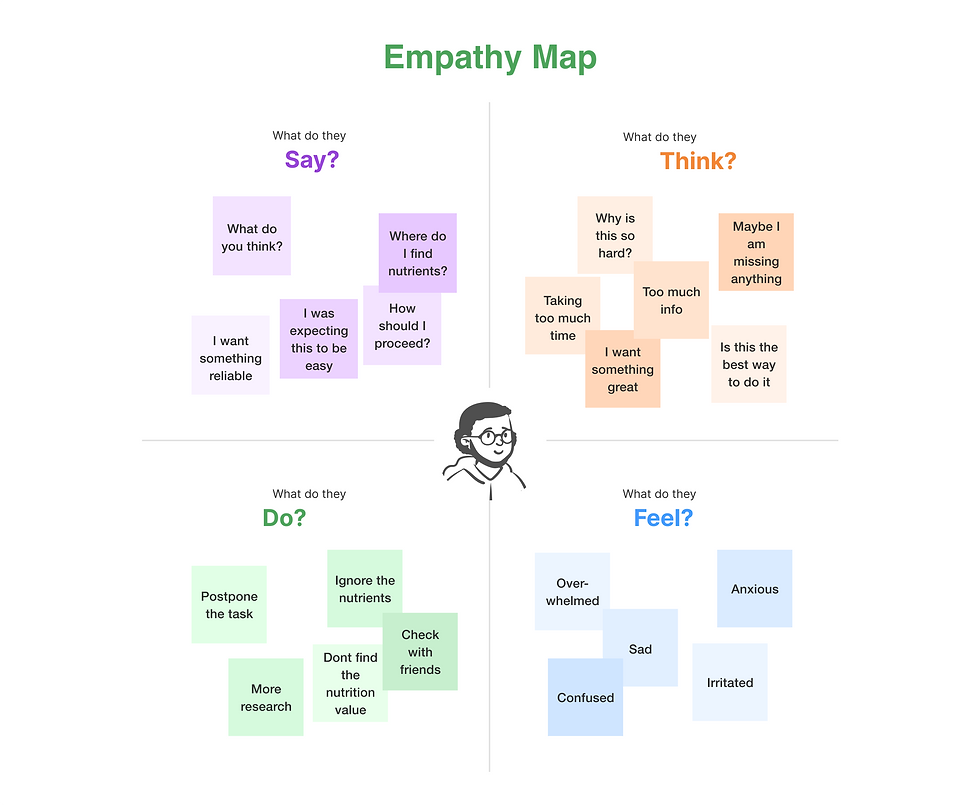
To analyze the data, I laid out the content in an empathy map in order to further empathize and discover what the underlying goal is.
Excerpts from interviews


.png)
Primary Persona
I continued defining, by putting this information into perspective and creating a primary persona: Sourav
Sourav is a friendly, and hardworking 26-year-old. He is a software development engineer in a MNC and orders food from apps all the time due to time constraints. He finds it extremely difficult to keep a check on his nutrition intake between 9-7 work hours.
This experience of constant food ordering has made him worried about the his health. He is our autonomous urban fitness enthusiast.

Journey Map
Let’s follow Sourav on a day when he goes to the office:
It’s Tuesday and Sourav wakes up quite excited to work. But it is a challenge to get ready on time and prepare breakfast and lunch. So he takes both meals from outside to reach office on time. At least he was happy, not ordering dinner and being able to prepare a healthy meal at home. But now he is worried about a day's calories.

Problem Statement and HMW
The empathize stage helped define the problem statement and the 3 How might we that illustrate focus points.

Wireframes
Paper Wireframes
Quickly iterating over paper wireframes for some idea exploration made me realize most important features for a user while using the app. I tried to provide apt and useful info on the home screen for easy navigation.

Low-fidelity Wireframes


.png)


Low-Fidelity Prototype
Using the completed set of digital wireframes, I created a low-fidelity prototype. The primary user flow I connected was adding a recipe and getting the nutrition chart, so the prototype could be used in a usability study.

Usability Study
I conducted a virtual unmoderated usability study with a group of individuals with the low-fidelity prototype with a few prompts of adding ingredients, filtering nutrients for the chart, saving the recipe etc.
To analyse the data from the study, I laid out the content in an affinity diagram in order to further empathise and discover what issues are faced while using the prototype.

Refinement of the mocks
Findings from the study helped me guide the designs from wireframes to mockups and revealed what aspects of the mockups needed refining.
First Refinement
Early designs allowed for adding ingredients names, but after the usability studies, images for ingredients have been added as it's easier to look at a glance for recipe ingredients.
Before usability study
After usability study
.png)
%20(1).png)
Second Refinement
After the usability studies, almost all users don't know whether recipe is healthy or not, so I added Health score section in nutrition chart so that users can know about the score of the recipe easily.
Before usability study
After usability study
.png)

Third Refinement
The usability study shows that participants want the ability to categorise the recipes into collections.
Before usability study
After usability study

Moodboard
.png)
Final Work
High-fidelity screens
.png)


High-fidelity Figma prototype
Next Steps
As a next step, I would have conducted other rounds of usability studies to validate whether the pain points users experienced have been effectively addressed.
Alongside this, would have focused on more user research to determine any new areas of need.
Explorations on Natural Language Processing and AI, where just by an image - we could give an approximate nutrient value chart and calorie indicator.